

Are your cloud bills spiraling out of control? You’re not alone. As more businesses embrace the cloud in 2025, many are caught off guard by how quickly costs can escalate. While cloud platforms offer unmatched flexibility and scalability, they can quietly erode your budget without the right controls in place. That’s where cloud cost optimization comes in. By applying practical, proven strategies, you can reduce waste, manage spending more effectively, and maximize the value of every dollar spent. In this blog, we explore the top techniques companies are using today to cut cloud costs without compromising performance.
What is Cloud Cost Optimization?
Cloud cost optimization means using your cloud services in the smartest way possible. It helps you avoid paying for things you do not need and makes sure you only use what is required. Instead of just cutting costs, the goal is to get better value from your cloud. This includes removing unused resources, picking the right plans and tracking how everything is used. When done well, it keeps your cloud fast, smooth and budget friendly.
Why Cloud Cost Optimization Strategies Matter
Global cloud spending keeps climbing. Gartner predicts companies will invest approximately $723 billion into public cloud services in 2025. This represents a jump of more than twenty‑one percent from last year’s total.
At the same time, most firms struggle to keep those costs in check. The Flexera 2025 State of the Cloud Report shows that 84% percent of organizations consider cloud spending their top challenge. Many organizations blow past their budgets by an average of seventeen percent.
These numbers show why cost optimization is critical –
- Unlock Growth with Smarter Spending – Every unused resource is a missed opportunity. Cutting waste frees up funds to invest in innovation and expansion.
- Improve Application Performance – Tuning workloads to actual demand improves response times. It also ensures smoother experiences for end users.
- Strengthen Collaboration Across Teams – Clear cost visibility helps IT, finance and product teams align. Shared ownership leads to better decision-making.
- Scale Operations Without Fear – With predictable spending in place, teams can grow workloads confidently. Controlled costs mean fewer surprises.
- Increase Sustainability Through Efficiency – Merging idle resources lowers energy use. Optimizing cloud usage supports both business and environmental goals.
- Start Data Driven Edge and AI Projects – Cloud heavy workloads like AI need stable budgets. Cost control ensures these projects stay possible and effective.
- Enhance Security Through Simplicity – Fewer untracked or idle instances mean fewer attack points. Visibility to usage helps detect risks early.
- Recover Faster from Disruptions – Distributing workloads across regions improves resilience. In an outage, businesses can bounce back more quickly.
- Boost Business Continuity Planning – Cloud optimization encourages resource placement that reduces downtime. That means steadier service and quicker recovery.
- Create a Culture of Cost Awareness – When teams understand where money goes, they spend more wisely. Small changes can lead to big long-term savings.
Key Components of Cloud Cost
To manage cloud spending effectively, you must first understand where the costs come from. Each service you use contributes to your total cloud bill in a different way. Here are the main components that make up most cloud expenses –
1. Monitoring and Management Tools (CloudWatch, Azure Monitor, etc.)
Cloud platforms charge for logging, alerting and performance tracking tools. These services seem small on their own, but in large environments, their joint cost can become significant. They are essential for visibility and control.
2. Networking Components (VPC, NAT Gateway, Load Balancers)
Charges apply to private networks, routing traffic and balancing workloads. These services help keep cloud systems connected and available. Yet, costs can quietly add up. This is especially true in complex setups or multi-region deployments.
3. Third-Party Licensing and Marketplace Tools
Apps and services bought from cloud marketplaces often come with license fees. This includes solutions like backup services, security tools, or analytics platforms. These costs are besides infrastructure charges and can grow over time if not tracked.
4. Data Transfer and Network Traffic
Moving data out of the cloud or across regions is not free. Charges increase with outbound traffic, especially for media-rich apps or platforms that sync large data sets across locations.
5. Compute Services (EC2, Lambda, App Engine)
This is typically the largest expense in a cloud setup. You are charged based on the compute instance type, size and how long it runs. Serverless functions also charge per execution and runtime. Optimizing this area brings the biggest impact.
6. Managed Databases (RDS, DynamoDB, BigQuery)
Costs here include data storage, compute usage, read and write operations and backup. Managed databases are efficient, but if left running at full power or oversize, they can become costly fast.
7. Storage Services (S3, EBS, Azure Blob)
You pay based on how much you store. You also pay based on how often you access the data. Keeping all data in high-speed storage is expensive. Tiering data between hot and cold storage helps cut unnecessary costs.
Best Practices for Cloud Cost Optimization
With the right approach, businesses can save money, improve performance and scale with confidence. In the image below, we can see the most effective strategies for cloud cost optimization in 2025.
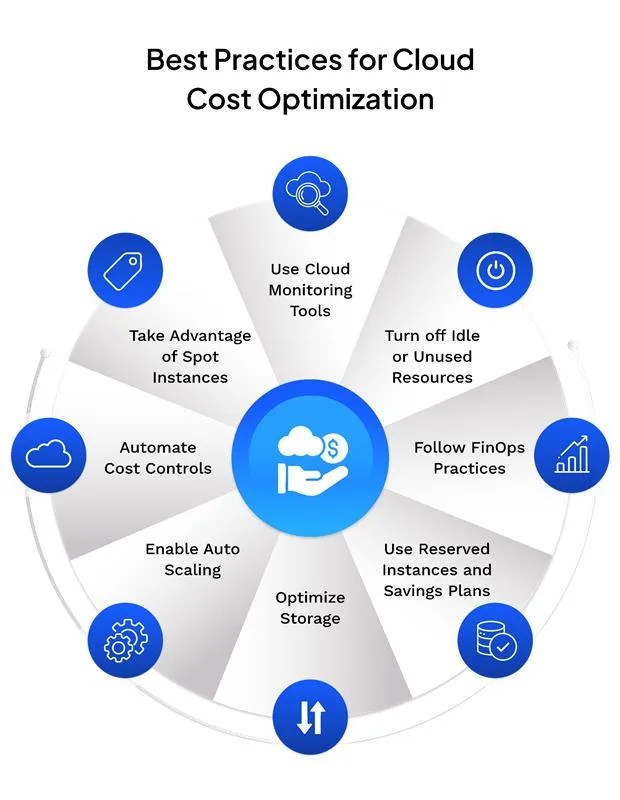
1. Use Cloud Monitoring Tools
Start with visibility. Tools like AWS Cost Explorer, Azure Cost Management, and Google Cloud Billing help track usage. They allow you to watch trends. They also help spot unusual spending. These tools make it easier to budget, analyze patterns, and take fast action when needed.
2. Turn Off Idle or Unused Resources
Resources often stay active long after they are needed. Unused servers, storage volumes or databases continue to charge you. Regular audits help find these and shut them down, reducing waste without affecting performance.
3. Follow FinOps Practices
FinOps is a modern way to manage cloud spending by bringing finance, engineering and operations teams together. It promotes shared responsibility and improves decision-making. FinOps ensures that every cloud dollar spent is tied to a business goal.
4. Use Reserved Instances and Savings Plans
For predictable workloads, long-term pricing options like Reserved Instances or Savings Plans offer major savings. These can reduce costs by up to seventy-two percent compared to pay-as-you-go prices.
5. Optimize Storage
Different types of data need different storage. High-performance storage is great for active data. Cold data can move to cheaper options like Amazon S3 Glacier or Azure Archive Storage. This saves money while making data available when needed.
6. Right Size Your Resources
Often, cloud services are set up with more capacity than required. Right sizing helps match the type and size of resources to actual usage. This reduces waste and improves system performance without sacrificing reliability.
7. Enable Auto Scaling
Auto scaling adjusts cloud resources in real time based on traffic and demand. This way, you avoid over-provisioning and ensure your system handles spikes without overpaying during low-use periods.
8. Automate Cost Controls
Automation reduces errors and improves consistency. You can set rules to shut down non-production environments at night. You can also control resource usage. Additionally, you can send alerts when spending crosses a certain limit. This makes cost control easy and reliable.
9. Take Advantage of Spot Instances
Spot Instances are unused resources sold at discounted rates. They can be up to ninety percent cheaper than regular instances. These are perfect for tasks that are flexible and can handle interruptions, like batch processing or testing environments.
10. Apply Proper Tagging
Tagging helps you organize and track resources by department, team or project. This increases visibility and makes it easier to assign costs and find where optimizations are needed. It also helps prevent duplicate or orphaned resources from going unnoticed.
Common Mistakes to Avoid in Cloud Cost Optimization
Even seasoned teams can let cloud bills creep up. Watch for these pitfalls and trim spend without hurting performance.
- Leaving “zombie” resources alive – Test VMs, unattached EBS volumes or forgotten snapshots keep ticking. Tag everything, set TTL policies and run weekly cleanup jobs to kill what no one uses.
- Overprovisioning compute and storage – Oversized instances and generous storage buffers feel safe but waste cash. Right‑size quarterly and rely on auto‑scaling so capacity grows only when traffic does.
- Letting dev and QA environments run 24×7 – Non‑production stacks don’t need nights and weekends. Use schedules or serverless functions to hibernate outside working hours.
- Ignoring regional price gaps – The same workload can cost 20‑30 percent more in one region than another. Compare price calculators before you launch and move data where latency allows.
- Skipping reserved instances and savings plans – Steady workloads should never run at full on‑demand rates. Analyze a year of usage, commit to the right terms and lock in discounts.
- Misconfiguring auto‑scaling – Overly conservative thresholds scale up too early, while missing cool‑down timers leaves capacity idle. Test policies underload and enable predictive scaling where available.
- Poor tagging and weak governance – Without consistent tags, cost reports turn into guesswork and orphaned spend slips through. Enforce tag policies in CI/CD pipelines and block deployments that skip them.
- Overlooking data transfer charges – Cross‑region replication, chatty micro‑services and egress to the public internet all add up. Map traffic flows and co‑locate heavy‑talking services to cut bandwidth fees.
- Neglecting security and compliance costs – Skimping on encryption, posture management, or audit logging is risky. You face fines that dwarf any short-term savings. Budget for security upfront; prevention is cheaper than a breach.
- Lack of continuous monitoring – Cloud pricing changes and new services emerge every month. Set automated alerts for spending spikes and review dashboards in regular FinOps meetings.
Case Studies of Cloud Cost Optimization
Case Study 1 – Cloud Cost Optimization for a Fintech Customer in the UAE
A leading fintech company in the UAE approached us to handle rising cloud expenses affecting their operational efficiency. After a detailed assessment, our cloud experts identified underutilized resources, oversize compute instances and a lack of automated scaling policies.
We implemented a tailored cloud cost optimization strategy. It included rightsizing virtual machines and enabling auto-scaling. We shifted workloads to more cost-effective storage and compute tiers. We also introduced cost monitoring dashboards and set alerts for usage thresholds.
The customer achieved a significant reduction in their overall cloud spend. They reduced costs by 40 to 50 percent. This was accomplished without impacting performance or availability.

Conclusion
Cloud cost optimization is important in 2025. More businesses rely on the cloud for daily operations. This leads to growing and often unpredictable expenses. Without proper control, these costs can quietly grow over time. Companies can manage their cloud spending more effectively by tracking usage. They should also remove unused resources, automate tasks, and improve teamwork. The aim is not just to reduce costs. It is also to get better value and improve performance. Additionally, businesses need to stay prepared for future growth. In the end, cloud cost optimization helps businesses stay efficient, secure, and ready for whatever comes next.
FAQs
1. How can I find out where I am overspending in the cloud?
Use cloud monitoring tools like AWS Cost Explorer, Azure Cost Management, or Google Cloud Billing. These tools help track usage and identify high-cost areas.
2. What are the most common ways companies waste cloud money?
Leaving idle resources running is one of the most common mistakes. Not using savings plans is another frequent error. Overprovisioning storage or compute power also contributes to waste.
3. Can automation help reduce cloud costs?
Yes, automation can shut down unused resources, manage workloads based on demand and send alerts when costs go up.
4. What is the right sizing in cloud cost optimization?
Right sizing means adjusting the size of your cloud resources to match actual usage. This avoids paying for more than you need.
5. How does FinOps help with cost optimization?
FinOps brings finance, tech and operations teams together. It helps everyone understand cloud spending and make better decisions.
6. What are Reserved Instances and how do they save money?
Reserved Instances are long-term cloud plans. They cost less than on-demand services and work well for steady workloads.
7. Does cloud cost optimization affect performance?
No, when done right, it improves performance by removing waste and using resources more efficiently.
8. Is cloud cost optimization a one-time task?
No, it is an ongoing process. Regular reviews, updates and monitoring are needed to keep costs under control.





You must be logged in to post a comment.